
With OSX Lion, when you select « About this Mac » => « More Info » (or open the System Profiler), it displays your computer model name in a readable format.
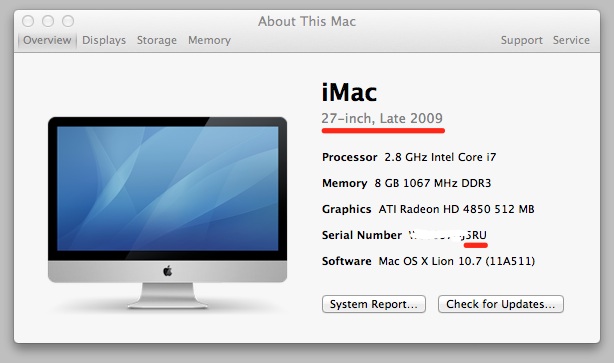
After a little snooping with HTTPScoop, I found that the name comes from an Apple server.
System profiler will send the last 3 characters of your machine serial number and the server will send back the machine name, in xml format.
My iMac serial ends with « 5RU » so calling the url below and passing « 5RU » as a parameter:
curl -o - "http://support-sp.apple.com/sp/product?cc=5RU&lang=en_US"gives:
<?xml version="1.0" encoding="utf-8" ?>
<root>
<name>CPU Name</name>
<configCode>iMac (27-inch, Late 2009)</configCode>
<locale>en_US</locale>
</root>
Changing the locale works:
curl -o - "http://support-sp.apple.com/sp/product?cc=5RU&lang=fr_CH"gives:
<?xml version="1.0" encoding="utf-8" ?>
<root>
<name>CPU Name</name>
<configCode>iMac (27 pouces, fin 2009)</configCode>
<locale>fr_FR</locale>
</root>
It works also with the iPhone:
curl -o - "http://support-sp.apple.com/sp/product?cc=A4S&lang=en_US"gives:
<?xml version="1.0" encoding="utf-8" ?>
<root>
<name>CPU Name</name>
<configCode>iPhone 4</configCode>
<locale>en_US</locale>
</root>
Enjoy.
it needed the last 4 digits to work for my mac book pro: « DF91 ». Just F91 returned an error
Same for ipad 2 — needs the last 4 digits.
If you have old serial number 11char length, you should use 3 chars from end, if you have a new serial number 12char length, you have to use 4 chars from end.
1. Is it possible to get partnumber/model id ?
2. is there apple api to get configuration details of mac?