Pause ArqBackup when you wake up your Mac

March 6, 2013 – 09:00 Share on Twitter

After having tried all almost-free cloud-based (Bitcasa, Mozy, etc…) backup solutions, I tried Arq, and since August 2012, I use it without problems.

I backup 120G and it costs me $11 per month for the Amazon S3 storage. Not bad. Arq can also backup to Amazon Glacier, for a fraction of this cost.

And Arq backups are encrypted with your own password. Take that, Skynet!

My problem is that I’ve setup Arq to backup every hour, and when I wake my Mac, Arq starts a backup.

When you wake up your Mac, it restarts everything like TimeMachine, other services running, it may even start indexing your disk, just for fun.

So every time, I had to manually pause Arq for 10 minutes so my Mac doesn’t suffer under the load.

When I saw that with the latest Arq version (3.1) there’s a possibility to control Arq via the command line, I automated this “pause-Arq-for-10-minutes-when-waking-up”.

For this, you’ll need SleepWatcher, a tool by Bernhard Baehr that allows you to run a script when your Mac wakes up or goes to sleep. We’re only interested in the wake up feature.

Start by installing SleepWatcher with HomeBrew.


brew install sleep watcher

copy the launchd configuration file:


cp /usr/local/Cellar/sleepwatcher/2.2/de.bernhard-baehr.sleepwatcher-20compatibility-localuser.plist ~/Library/LaunchAgents

Now we need to put some commands to run when the Mac wakes up in a file named “.wakeup” in your home dir.


vim ~/.wakeup

My wakeup file contains:


#!/bin/sh

/Applications/Arq.app/Contents/MacOS/Arq pause 10

echo "Arq paused"

make the .wakeup file executable


chmod a+x ~/.wakeup

Load the launched config file:


launchctl load ~/Library/LaunchAgents/de.bernhard-baehr.sleepwatcher-20compatibility-localuser.plist

Voila, you’re done.

Put your Mac to sleep, and wake him.

The Arq menubar icon should show the pause icon: Screen Shot 2013-03-05 at 12.50.17

Happy?

flattr this!


Disabling Autolayout in Xcode

March 5, 2013 – 12:51 Share on Twitter

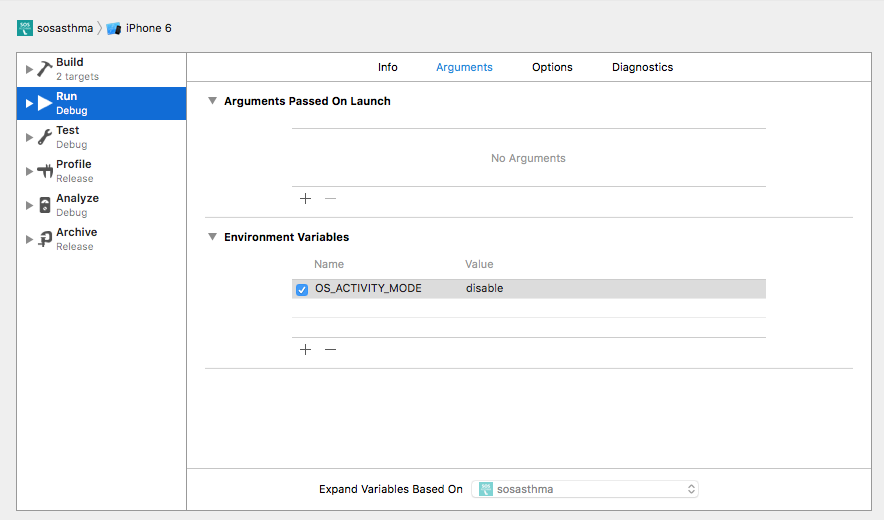
Every time you add some user interface to your iOS app, Xcode will enable by default the Autolayout flag, which is a PITA because it’s not supported for 5.1 targets.

I found a StackOverflow answer that solves this problem, but it needs to be done every time Xcode is updated.

Some scripting may help to automate this:

In your favorite terminal (you’re using iTerm2, right?)


cd "/Applications/Xcode.app/Contents/Developer/Platforms/iPhoneOS.platform/Developer/Library/Xcode/Templates/File Templates/User Interface/"

find . -name "*.xib" -exec perl -i -pe 's#<bool key="IBDocument.UseAutolayout">YES#<bool key="IBDocument.UseAutolayout">NO#' "{}" \;


Voila. You’re done.

Bonus: Duplicate the “User Interface” folder before applying the transformation and rename it “User Interface_on”.

Rename the modified folder to “User Interface_off” and they’ll both appear in Xcode when you create a new interface file.

Screen Shot 2013-03-05 at 11.41.35

flattr this!


APNS Resources, updated.

October 23, 2012 – 16:45 Share on Twitter

Just a reminder: I keep my list of Apple Push Notification Service Gateways up-to-date.

You can find it on my blog here.

flattr this!


App.net services

October 3, 2012 – 21:45 Share on Twitter

If you use app.net (app.net, a paying alternative to twitter, without the ads, the sponsored tweets, etc…), these websites will provide functionalities or informations you may need.

app.net
The Mothership

http://app.phuu.net
Search your followees that are on app.net (Netbot for iOS has the same function).

http://twapp.phuu.net
Cross-post from app.net to Twitter ($5 lifetime).

http://recentusers.com
Shows the last registered users on app.net along with a user count.

http://appnetizens.com
Tons of analytics about app.net.

https://ifttt.com/
Not really an app.net dedicated site, but allows you to create automated tasks with app.net.

https://github.com/appdotnet/api-spec/wiki/Directory-of-third-party-devs-and-apps
Directory of third party devs and apps (Official)

flattr this!


Rotate backup disks with SuperDuper

August 15, 2012 – 15:52 Share on Twitter

If, like me, you’re paranoid with your data, you surely have 2 backups of your data, one being off-site.

My backup strategy is as follow: I backup my desktop machine on 2 external disks with SuperDuper. I keep one backup disk off-site and the other one near my machine so I can backup at regular interval.

Every week, I swap the backup disks, so the off-site backup is almost up-to-date. (I also backup my daily work to Dropbox, just to be safe).

When I swap disks, SuperDuper doesn’t recognize the disk and show me this dialog:

SuperDuper message

To avoid this problem, I emailed the SuperDuper support and I got this answer 5 minutes later from Dave Nanian himself:

SuperDuper doesn’t lock a drive choice to its name. Rather, we use its low-level UUID, to avoid problems when users rename drives (or have two drives named the same). So, by default, this won’t work.

However, you can use a tool that we provide to set the UUIDs for the drives you want to rotate the same. They need not be named the same.

To do so, use the little program called SDDiskTool that’s inside the SuperDuper bundle. It’s in SuperDuper!.app/Contents/MacOS/SDDiskTool. You’d use:

SDDiskTool -g /Volumes/some-disk-name

to get the UUID. Then, to set it, you’d use:

sudo SDDiskTool -s the-UUID /Volumes/some-other-disk-name

So, pick the one you want to be the original, and set all the other UUIDs to be the same. Then, no matter which one you have attached, we’ll write to it.

Voila, problem solved.

PS: Before whining on Twitter, always ask support, I always (well, most of the time) get the answer I need.

flattr this!


Return of Open Sesame

July 11, 2012 – 00:03 Share on Twitter

Craig Hockenberry (from the IconFactory) published in 2009 (on his personal website furbo.org) a very useful script able to open the Documents folder of any app installed in the iPhone Simulator. Because the iPhone simulator is now able to run with different versions of the iOS SDK, it has stopped working.

Here’s an updated and working version:

#!/bin/sh 

if [ -z "$1" ]; then
  echo "usage: $0  [ Preferences |  ]"
else
  app=`ls -1td ~/Library/Application\ Support/iPhone\ Simulator/*/Applications/*/$1.app`
  dir=`dirname "$app"`
  if [ "$2" = "Preferences" ]; then
    open -R "$dir/Library/Preferences"
  else
    open -R "$dir/Documents/$2"
  fi
fi

Below is the original text describing how to use it:

Put this script somewhere on your PATH and name it opensim. Use it to find the most recent application loaded in the simulator and open the Preferences, Documents or a named document in the Finder.

For example, to open the current Documents folder for an application in the iPhone Simulator, just do this:

$ opensim Thunderbird

To open a document within that folder, you can do this:

$ opensim Thunderbird chockenberry.db
$ opensim Thunderbird accounts.plist

You can easily get to your preferences folder with:

$ opensim Thunderbird Preferences

Notice how I haven’t mentioned a GUID in this essay? That’s the feature…

© 2012 Craig Hockenberry. All rights reserved.

flattr this!


Get your Apple device model name in a readable format

August 1, 2011 – 13:36 Share on Twitter

With OSX Lion, when you select “About this Mac” => “More Info” (or open the System Profiler), it displays your computer model name in a readable format.

About This Mac

After a little snooping with HTTPScoop, I found that the name comes from an Apple server.

System profiler will send the last 3 characters of your machine serial number and the server will send back the machine name, in xml format.

My iMac serial ends with “5RU” so calling the url below and passing “5RU” as a parameter:

curl -o - "http://support-sp.apple.com/sp/product?cc=5RU&lang=en_US"

gives:

<?xml version="1.0" encoding="utf-8" ?>
<root>
<name>CPU Name</name>
<configCode>iMac (27-inch, Late 2009)</configCode>
<locale>en_US</locale>
</root>


Changing the locale works:

curl -o - "http://support-sp.apple.com/sp/product?cc=5RU&lang=fr_CH"

gives:

<?xml version="1.0" encoding="utf-8" ?>
<root>
<name>CPU Name</name>
<configCode>iMac (27 pouces, fin 2009)</configCode>
<locale>fr_FR</locale>
</root>


It works also with the iPhone:

curl -o - "http://support-sp.apple.com/sp/product?cc=A4S&lang=en_US"

gives:

<?xml version="1.0" encoding="utf-8" ?>
<root>
<name>CPU Name</name>
<configCode>iPhone 4</configCode>
<locale>en_US</locale>
</root>

Enjoy.

flattr this!


It’s not my fault

February 1, 2011 – 21:44 Share on Twitter

Bugs are always your fault. Actual bugs in the framework accounts for an infinitesimal percentage of bugs, and even if there is a bug in there, you’re the one who pissed it off.

Mike Lee, aka @bmf

So many times I’ve heard people say: “it’s not my fault, it’s a bug in the framework/OS/firmware/WTFware”.

Do what you’re paid for. Make it work.

Read the complete post here: Layers + Ruler = Swearing

flattr this!


APNS Resources

March 13, 2010 – 11:43 Share on Twitter

Just a reminder: I keep my list of Apple Push Notification Service Gateways up-to-date.

You can find it on my blog here.

flattr this!


NSConference 2010

February 9, 2010 – 17:51 Share on Twitter

I was in Reading UK last week to attend the NSConference 2010. I will not write a full report of what happened there, because others will do that better.

The only thing I want to say is:if you want to improve your skills in Cocoa, for Mac, iPhone or iPad, you should go: you’ll have the best speakers, the best organization you can dream of. And you will come back with new contacts, new ideas, new code to try.

You can (should) read Alex Repty report here.

flattr this!